
What charging your EV costs, and how to track it
The expense log records two things: what you paid at a public charger, and what a home charge cost, which the app works out from the percentages.
The feature is free with no premium. Expenses sits in the profile, so it needs a sign in, and the account carries the records to another phone.
Why charging costs stay invisible
Money spent on petrol shows up by itself: one payment, one receipt. Charging costs split in two, and both halves hide. At a public charger the payment stays inside the provider's own app, and every network has an app of its own. Charging at home disappears into the household electricity bill, where the car cannot be told apart from the heater and the fridge.
So most drivers only estimate what the car costs them per month. That is not enough when you want to compare with petrol, or when you are deciding whether a home charger is worth installing.
What the expense log does
In the GeoCharge app, under the profile menu, which means once you are signed in, there is a section called Expenses. It gathers every charging cost into one list, paid and home alike. One record is one charge.
Records are entered by hand, after the charge, with the plus button. That is deliberate: the app is not connected to your accounts with the providers and cannot see your payments. What it can do is hold exactly the figures you know to be right.
Two kinds of record
A paid charge
At a public charger you already have the exact amount, because the provider's app shows it. The record asks only for the amount and the date. No kilowatt hours are needed here, since the amount you paid is the final figure.
A home charge
At home there is no ready figure anywhere, and the electricity bill arrives at the end of the month with everything lumped together. So this record works differently: you enter the battery percentage you started and finished at, and the app works out the rest.
The calculation: battery capacity is multiplied by the difference in percent, the result is divided by the charging efficiency and multiplied by your electricity tariff.
An example. A 60 kWh battery taken from 30 percent to 80 percent. The battery gains 30 kWh, while the meter, because of a 10 percent loss, records 33.3 kWh. At a tariff of 0.25 GEL that is 8.33 GEL.
Where those numbers come from
A home calculation needs three settings, filled in once on the expenses screen.
- Battery capacity. The usable capacity in kilowatt hours, meaning the energy the car actually uses. It is normally a little below the figure in the brochure.
- Electricity tariff. What one kilowatt hour costs you at home, taking your day rate, night rate and consumption band into account. A car charged on the night rate costs noticeably less.
- Charging loss. Part of the energy drawn from the meter never reaches the battery: it goes to heat in the charger, the cable and the cells. The default is 10 percent and you can change it.
That loss is why a plain multiplication of capacity by tariff comes out too low. The meter always counts more than the battery receives.
What the screen shows
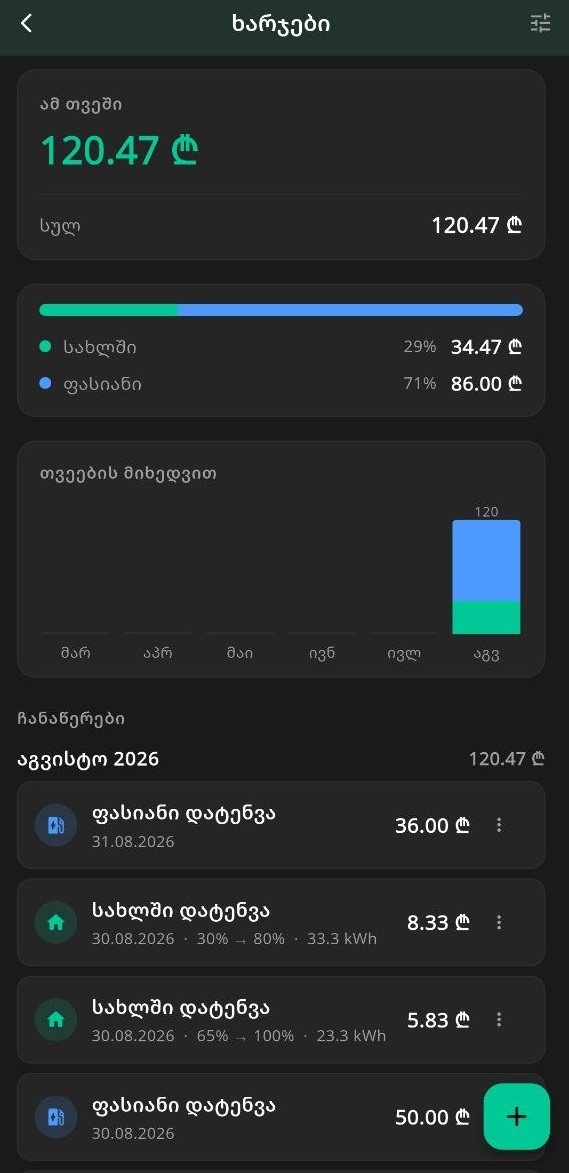
The screen reads in four parts:
- This month and all time. The current month's total alongside the total of the whole history.
- The home and paid split. One bar and two figures showing how much of the spending goes to charging at home and how much to public chargers.
- The last six months. A bar chart where each month is stacked from its home and paid parts, so a rising or falling trend is visible.
- The records. A list grouped by month, each month with its own total. A home record also carries the percentage range and the kilowatt hours. Editing and deleting happen from the three dot menu.
A record does not rewrite history
Every home record carries the settings it was created with: capacity, tariff and loss. If the tariff goes up or you change the car, older records stay exactly as they were.
This matters, because otherwise changing one setting would recalculate the whole history and last year's charge would suddenly show a different price.
How much you need it
If you charge only at public chargers, twice a month, the log will not tell you much. In three cases it is the only way to see the real figure:
- If you charge at home. That cost disappears into the electricity bill and cannot be counted any other way.
- If you are comparing with petrol. The comparison is worth making only when one side is real records rather than a guess. The comparison itself has its own guide: Electric or petrol, what 100 km actually costs.
- If you drive for a living. Taxi, delivery or company mileage: here the monthly total comes straight off your income.
One more case is buying a home charger. Before you spend, it helps to have a few months of real records, so you can see what you would save. What an installation needs is covered here: Home charger installation, what it needs and what drives the price.
What it does not do
- It pulls nothing automatically from the providers' apps. You type the amount.
- It does not fill in your electricity tariff, since that depends on your own bill.
- It does not price a future charge. For that, before you plug in, there is the calculator.
Getting started
Sign in, open the profile, go to Expenses and fill in the settings: battery capacity, electricity tariff and loss. After that, each charge leaves you one record to add.
If you do not yet know the tariff at a given station, network prices are in one table: charging tariffs. The price of a specific station is in the charger list. What charging costs in Georgia in general has its own guide: How much does it cost to charge an EV in Georgia.
Frequently asked questions
Where is expense tracking in the GeoCharge app?
Under the profile menu, in the Expenses section. The plus button for a new record is there, along with the settings where you enter battery capacity, electricity tariff and charging loss.
Does expense tracking cost anything?
No, it is free and needs no premium. The only requirement is being signed in, since Expenses sits in the profile menu. Records are kept on the phone and tied to your account.
How is the cost of a home charge calculated?
Battery capacity is multiplied by the difference in percent and by your electricity tariff, and the result is divided by the charging efficiency, because part of the energy never reaches the battery. A 10 percent loss means dividing by 0.9. A 60 kWh battery taken from 30 percent to 80 percent draws 33.3 kWh, which costs 8.33 GEL at a tariff of 0.25 GEL.
Will I lose the records if I change phone?
No. The records follow the account and download as soon as you sign in on the new phone.
Why does the app not track the cost automatically?
Because charging payments happen inside the providers' own accounts and GeoCharge is not connected to them. So you enter the amount for a paid charge, and the app works out a home charge from your own settings.
More guides
See also
Map and live status are in the app
This page shows which chargers exist and where. The map, exact locations, real-time availability and route planning live in the free app.